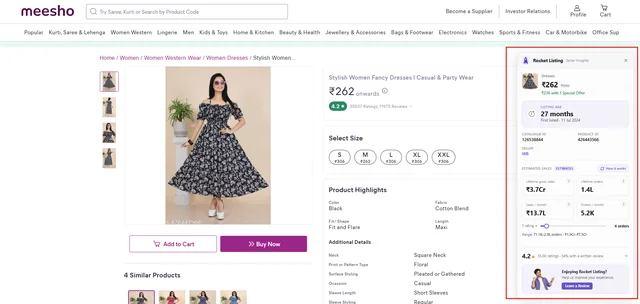
Price, MRP and discount
The price, MRP, discount and offer the product page shows, collected in one card so you can compare products quickly.
Seller Insights
As a Meesho analytics tool, Rocket Listing's Seller Insights card appears on meesho.com product pages and shows price, rating breakdown, review count, listing age and badges, plus estimated sales worked out from rating counts. They are estimates, not Meesho's numbers. It covers products you research; your own payouts stay in your Meesho Payments tab.

Estimates from public ratings, not Meesho data
Seller Insights runs on meesho.com product pages for anyone who has the Rocket Listing extension installed, with no sign-in and no paid plan. Its sales figures are modelled from public rating counts and an adjustable assumption. They are not the orders, revenue or profit of any seller.
The price, MRP, discount and offer the product page shows, collected in one card so you can compare products quickly.
A rating donut and per-star bars, the review count and the share of 1-star and 2-star ratings.
How long the product has been listed, which matters when you judge how many ratings it earned in that time.
How many designs and sizes the listing offers, and the badges Meesho shows on it.
A model, not data: rating count times an orders-per-rating assumption you can change with a slider.
The card shows the state the seller is registered in and Meesho's catalogue and product IDs. It never shows a seller's name or real sales.
Open a product on meesho.com and the card appears above the product details, or floats at the bottom right. It reads the product data that Meesho's page has already loaded. If the full search reply was not sent, it asks Meesho's own search once, with your Meesho session, the way the page would. It adds no sign-in step, and the figures it works out stay in your browser: up to 40 products are cached there, and nothing from the card is sent to Rocket Listing's servers.
Use it when you research what to sell or where your price sits. Pair it with the scorecard in how to find products to sell on Meesho and your own margin in the Meesho profit calculator, because a product that sells is not necessarily a product that earns.
Meesho does not publish a product's orders to other sellers, so the card builds a model from what is public. Lifetime orders are the rating count times an assumed number of orders per rating. Sales are those orders times the current price. Monthly orders are the lifetime orders divided by the listing age. The assumption starts at 10 orders per rating, with 5 and 20 as the other scenarios, and a slider lets you move it. It is a provisional modelling assumption, not a Meesho benchmark.
| Orders per rating | Lifetime orders | Estimated lifetime sales | Estimated orders a month |
|---|---|---|---|
| 5 | 1,000 | ₹2,50,000 | 100 |
| 10 | 2,000 | ₹5,00,000 | 200 |
| 20 | 4,000 | ₹10,00,000 | 400 |
Say a product shows 200 ratings, costs ₹250 and has been listed for 10 months. The table shows what the three scenarios give. The spread between 5 and 20 orders per rating is a fourfold range, and that range is the honest answer: the card can show how large a product might be, never how large it is. The real ratio differs between categories and sellers.
The card's How it works button flips the four sales tiles to show the lower, base and higher cases, and the base case's multiplication written out. For the method with a worked example, and for a way to test the slider against your own orders, read how to check sales of a product on Meesho.
None of these reads is a verdict. They are prompts for questions, such as whether your photo, price or sizes could compete, and they are best checked against several products rather than one.
Meesho's own Supplier Panel is the source of record for your business. Its Learning Hub and official channel name the tools: Payments with Deductions and Compensations and Ads Cost, the Ads dashboard, Price Recommendation with a comparison view, Product Recommendations and the Quality Dashboard for return reasons. Menu names change, so open them in your account.
Seller Insights does not replace any of them. It adds a view they do not give: a rough look at other sellers' product pages. For fees and deductions, read Meesho seller fees and charges explained, and for the whole picture of tools by job, see Meesho seller tools, which also explains how analytics tools that read your own account differ from ones that read public pages.
How Rocket Listing works covers the rest of the extension. Rocket Listing is independent and not affiliated with Meesho.
By Rocket Listing TeamUpdated
Quick answers
It depends on the question. For your own orders, payouts and ads, Meesho's Supplier Panel is the source of record. For a rough look at other sellers' product pages, Seller Insights adds estimates. We rank no tool, and our own is described honestly here. Compare the options in our list of Meesho seller tools by job.
No. Meesho does not publish a product's orders to other sellers, and no outside tool can see them. Seller Insights estimates sales from public rating counts and an assumption you can change, so treat its figures as a rough range, never as the competitor's real numbers.
We cannot say, and we do not claim accuracy. The estimate is the rating count times an assumed number of orders per rating, which starts at 10 and can be moved between 1 and 50. The real ratio differs by category and seller, so the card is useful for comparing products, not for counting orders.
No. It runs on meesho.com product pages for anyone who has the Rocket Listing extension installed, with no Google sign-in and no paid plan. The Meesho autofill in the side panel does need a Google sign-in. The extension needs desktop Chrome 114 or newer.
No. The card works on meesho.com product pages only. Flipkart, Amazon and Myntra automation is not available yet, and Seller Insights has no Flipkart or Amazon version. The free profit calculators on this site already cover Meesho, Flipkart and Amazon.
Meesho's Learning Hub and official channel name a Payments tab with deductions and Ads Cost, an Ads dashboard, Price Recommendation with a comparison view, Product Recommendations and a Quality Dashboard for return reasons. Menu names change, so open each one in your own panel to see what it shows today.
Product research
A Meesho product page shows no order count, so you estimate: ratings times orders per rating, then listing age and price. A worked example, the limits and the free Seller Insights card.
Product choice
A six-check scorecard for choosing what to sell on Meesho, using Meesho's own Product Recommendations, Seller Insights estimates and your margin.
Profit
Returns, RTO, ads, discounts and other costs can eat more than extra orders earn. See six causes, a worked example and a weekly check.
Rocket Listing is an independent tool. Meesho, Flipkart and Amazon are trademarks of their respective owners, and Rocket Listing is not affiliated with, endorsed by or sponsored by them. Marketplace rules, fees and panel layouts change, so confirm current details in your official seller panel.
Record one Meesho listing, fill the next, and review before you publish.
Independent tool, not affiliated with Meesho, Flipkart or Amazon.